menu bar · macOS 14+ · free

Check your Razer mouse
battery on a Mac.

macOS shows battery for Bluetooth mice, but a Razer mouse on its 2.4 GHz dongle appears as a generic USB device and reports nothing to the system. MacRazer asks the mouse directly and puts the number in your menu bar.

Why macOS doesn't already show it: the dongle presents the mouse as a plain HID device with no battery service. The charge level only comes back if you ask for it in Razer's own vendor protocol, which is what this app does.

How to check it

  1. 1

    Connect over the dongle or USB-C, not Bluetooth. Razer only exposes battery over USB. On Bluetooth no app can read it, because the mouse never reports it.

  2. 2

    Download MacRazer.dmg from the latest release and drag it into Applications. The build is unsigned, so right-click → Open the first time.

  3. 3

    Grant Input Monitoring when asked (System Settings → Privacy & Security → Input Monitoring), then relaunch. macOS only applies the grant to a freshly-launched app, so the relaunch matters.

  4. 4

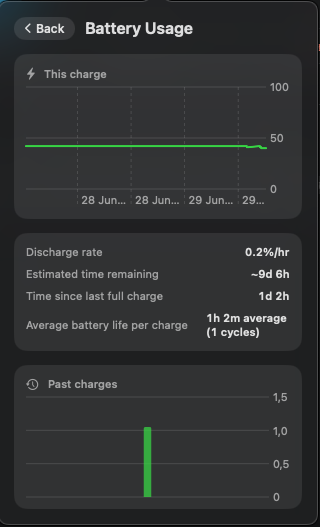
    The percentage sits in your menu bar. The mouse mark shows a lightning bolt while charging, and clicking it opens the full battery history.

MacRazer battery usage screen showing the discharge curve, drain rate, estimated time remaining, and a trend chart of past charge cycles

More than a percentage

01 · estimate

A learned time-remaining

A flat %/hour rate is wrong for a Li-ion cell. It sits on a long voltage plateau and then drops fast. MacRazer learns how long your mouse really spends at each percent and estimates from that, falling back to a linear rate until it has data.

02 · history

The whole discharge curve

The current charge is charted with the previous one dimmed behind it, so a recharge doesn't blank the view. Below it: drain rate, time since last full charge, and the average life across past cycles.

03 · warning

A low-battery notification

One notification when the charge drops below 15%. Charging re-arms it, so it won't nag you every poll, and you don't have to keep opening the popover to check.

04 · honest

It says when it doesn't know

A sleeping or unreachable mouse shows the last known value dimmed rather than inventing a number, and wired-only mice hide the battery UI entirely instead of showing a fake 0%.

Common questions

Why can't I see my Razer mouse battery in macOS System Settings?

Because macOS only surfaces battery for devices that report it through a standard service, which mostly means Bluetooth peripherals. A Razer mouse on its 2.4 GHz dongle enumerates as a generic USB HID device, and its charge level is only available through Razer's own vendor protocol.

Does this work over Bluetooth?

No. This is a hardware/protocol limit, not an app limitation: Razer doesn't expose the control protocol over Bluetooth, so the battery level simply isn't there to read. Use the dongle or a USB-C cable.

Which mice does it read battery from?

Verified on the Razer Cobra HyperSpeed and Atheris. Cobra Pro and other models use the same protocol and generally answer, but nobody has verified them on hardware here. See supported mice. Wired-only mice have no battery, and the app hides that section rather than reporting a fake value.

Is the percentage exact?

It's the mouse's own fuel-gauge reading, scaled from the raw byte the firmware returns. That's the same source Synapse uses. Expect the usual Li-ion quirks: the reading can recover a percent or two after the mouse rests, which MacRazer accounts for rather than treating as a recharge.

Questions or a mouse that doesn't report? Open an issue on GitHub.